System Design for Production Apps

When you watch videos about software, people talk about how to code, but they don’t show how to take what you’ve built and put it into production. Or the opposite extreme, they talk about crazy system design for supporting a billion users.
What’s missing is a path from A to B. How do we go from an entry level engineer who can code a bit, to a senior engineer that focuses on the larger system design.
In this video I’ll show you exactly what you need to concern yourself with from real world scenarios, and by the end you’ll confidently know how software in the real world does it.
So first off, what is system design? System design is how we organize the parts of a software system and decide how they work together.
That’s all there is to it!
but here are 3 categories you can think of:
- Where does it run? Servers, containers, cloud hosting, and how the pieces are deployed.
- How does it communicate? HTTP APIs, WebSockets, and message queues.
- How does it store data? Databases, caches, and file storage.
We will explore the major things to concern yourself for the majority of apps.
Now note, when you’re building software you may find some specialized needs, and part of being a good engineer is researching options, seeing what others have done, and trying things out.
So it’s impossible for me to cover everything here.
But you WILL have the skills to run your own complex software.
So, let’s get started with a high level overview as an introduction.
Beginner
First off, to get started, how much experience do you need to understand to get the most from this video? I would say you will get the most from this if you have some level of experience. This introduction section we will basically crash course the fundamentals, so if you’re already pretty experienced, you can use the timestamps to jump to any specific section.
Let’s do a complete overview by tracing a request e2e (end-to-end). Imagine opening a mobile learning app, entering your email, and starting a lesson.
What are we covering? This will cover the basics of many topics.
Why is this important? It will give us the foundation to make sure we frame the rest of the content and you’re not missing any foundational knowledge. It also makes sure we are on the same page with vocabulary etc.
What many people get wrong is that they believe a complex system wins, if they can make a complex diagram in a system design interview, they’re on top. This leads to people often reaching for microservices and complex diagrams WAY beyond what is actually needed. The goal is to make building easy, simple, and predictable FIRST before we worry about every possible “what-if”
💡 Tip[!tip]
Which BTW u can download my app if u want a real example
- Client: The mobile app runs on your device. It displays courses, handles navigation, plays video, and makes requests to the backend (the server-side).
- Backend + Hosting: The backend code runs on infrastructure hosted somewhere outside your phone. Deployment puts our application code and configuration into that environment so it can serve requests.
You may hear “backend” and think of just one single computer or service, but it can actually be an umbrella term to mean multiple services that work together.
Additionally, you may have serverless backends and persistent backends, the way these work are fundamentally different and will change how you design your backend. We’ll get into that in detail later.
- Language, Runtime, Framework: The client is built using a framework that helps organize the interface and application behavior. The backend can use a different framework. The frontend and backend are often completely separate apps and can be built with different programming languages. For example, Swift and JavaScript.
The framework uses that programming language and provides a collection of functions or tools to make building easier. In JavaScript this could be React, Next.JS, Elysia.
The runtime is like an execution engine for the code, making the code usable on the system. For JavaScript this could be Node.js or Bun, for example.
- Local storage: On launch, the app restores preferences and previously fetched content from device storage. It can also retrieve a saved authentication credential from protected storage. The same exists within a browser.
- Server storage (database): The backend reads and writes persistent records, including accounts, anything the user has access to, etc. Databases are a whole thing to learn about, and I have a lot of good resources dedicated to this matter. I have an 8 hour database design video as well as a one hour NoSQL database introduction. additionally, I have dedicated lessons on getting started with Postgres, SQLite, and various NoSQL dbs.
- Database Design All-in-One Tutorial Series (8 HOURS!)
- Intro to NoSQL Databases - System Design
- PostgreSQL Introduction - Beginner Crash Course
- Run Postgres in a Docker Container (Easiest PostgreSQL Setup)
- SQLite Introduction - Beginners Guide to SQL and Databases
- MongoDB Crash Course
- DynamoDB in 20 Minutes - Intro to NoSQL
- Intro to Prisma ORM
- Drizzle - ElysiaJS Full CRUD API Beginner Tutorial
- Client caching: The app keeps copies of server data in memory and can persist them between launches. That lets it display previously loaded content quickly including when connectivity is limited.
There are actually multiple layers of caching and as you add more layers it can be complicated to get right. You can have caching at:
The database level or database provider
Within the server process (An in memory object, such as a hash map)
a shared cache (like Redis)
Caching within the reverse proxy (NGINX)
within a CDN (Cloudflare)
Within the browser (Chrome)
Within client code (React Query)
- Requests and Auth: If you need to authenticate, you enter your email. The app sends a request asking the backend to deliver a verification code. This is an example password-less auth, essentially we are using the email only which:
- has the downside of requiring the person to also have access to the email,
- but in a way it acts almost like 2FA
- and validates that their email is active.
The request could be to a domain, but DNS associates this to an IP address. SO this gets into the “how the internet actually works” which is definitely important to know to some degree, but we’re not going to get in to the details right now.
- API: The backend exposes endpoints for operations such as requesting a code, retrieving courses, and saving progress. Each request has a method, a URL, headers, and sometimes a body. I have a dedicated video on APIs if you’re needing a refresher: API Design and Architecture - Backend Engineering Intro
- Serialization: The app encodes request data in a format such as JSON, and the server decodes it. Responses make the same trip in the other direction.
- HTTPS: The app communicates with the backend using HTTP secured with TLS. This encrypts traffic between client and server.
This laid the beginner foundation, hopefully nothing in here was too new to you, otherwise you might get lost on some of the upcoming topics as they all build on these.
Intermediate
What are we covering? Well we now have the foundational layer, so we can talk about some of the details. What are the most important things for a functional app.
Again, this section will be quite general, following the same approach of going through a variety of topics at a higher level, but it will be helpful to go a bit deeper so that we can understand the complete end-to-end.
Things like validation, rate limiting, auth, signatures, streaming, etc.
- Validation: Say we make some request, such as searching content. The backend checks that the request contains acceptable input before using it. Client-side validation helps the user experience, but the server still has to enforce its own rules. Some validation can be done within the application while some will be done at the database level. For example. You may have a check to limit the length of a search. The client can say “hey, that’s too long” but we ultimately need to enforce anything critical on the backend, validating all the data passed to the API.
When it comes to software design ideally you can have this as like a pipeline step in the request to response cycle, or built in such a way that it cannot accidentally be skipped.
- Rate limiting: Before sending an email containing a code, the backend limits how frequently someone can request one. This is an example of rate limiting and needs to exist across endpoints so we don’t get spammed requests. This is especially important for critical paths like auth.
- Authentication: You enter the code, and the app submits it to the backend. The server verifies that it matches, hasn’t expired, and hasn’t already been consumed.
We touched on it briefly in the previous section. One important thing you should understand is MFA and passkeys, as well as properly gating certain actions behind MFA.
- Authorization: The app requests your course library. The backend identifies you from the token, then checks which courses you can access. Identity and permission are separate checks.
- Data retrieval: The backend queries the relevant records and returns the course list. Keeping these queries efficient matters because database work contributes to the latency of the whole request.
- Response caching: Personalized responses need deliberate cache policies so one person’s data isn’t served to another. Shared network caches and the app’s own local cache are separate layers with separate rules.
- Rendering: The app decodes the response, updates its local cache, and renders the course list. You select a course, load a lesson, and press play. This is a common pattern. So for example with web applications, let’s say you have a todo list and you add an item, this can invalidate the list of todos, causing a fresh GET to retrieve the latest. There are various approaches to rendering. This change of data will cause a re-render of the frontend.
- Streaming and signed URLs: Say you have a video to watch, usually that video does not get stored on the device unless you download them for offline use. So, these can be streamed from the same backend, or a dedicated streaming service. For example, we could embed the YouTube video, and the actual streaming comes from YouTube servers. For something like a YouTube video, this is public. For private data coming from other platforms it is common to use a signed URL. This allows you to create temporary access for someone by verifying access on the backend and sending the URL.
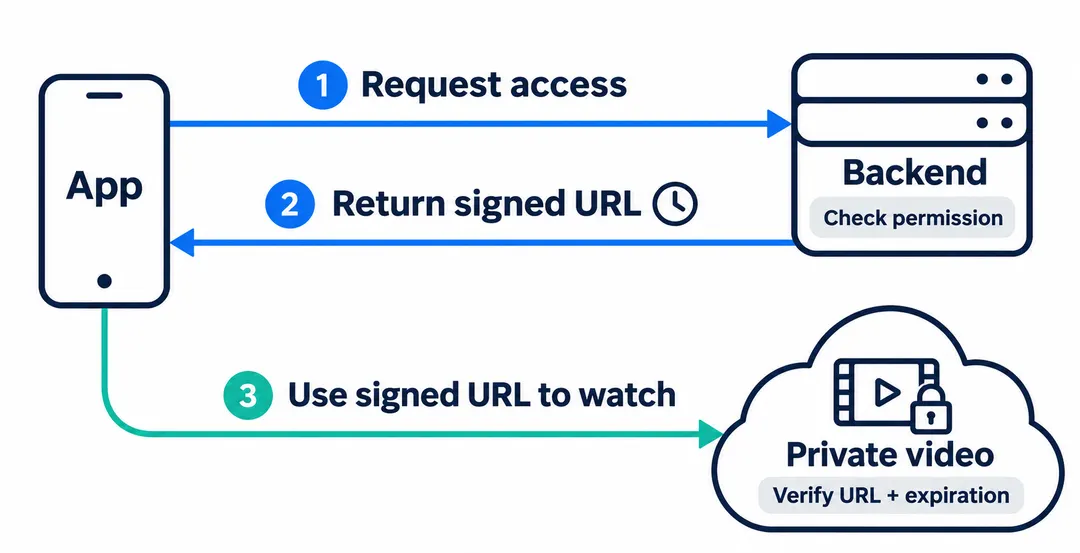
the service provides a key used in creation of the signature on our backend. This is important because the frontend should not have any secret keys or other things we don’t want being exposed. Assume all client/frontend stuff is visible.
- Object storage: The video files live in media storage, while the database holds metadata and references to them. Large media files have different delivery requirements from course records.
- CDN: A content delivery network serves files from servers distributed around the world. The video player streams from a nearby server, which can keep a cached copy so it doesn’t have to fetch the same content from the original source for every viewer.
Serverless vs Persistent Servers
💡 Tip[!tip]
To be clear, serverless is not without servers. It just abstracts away the server so we don’t have to think about it.Also to be clear, serverless does not always mean non-persistent (stateless functions).
What are we covering? Earlier in the lesson we talked about deploying to a server, but there are different approaches here depending on how much abstraction is happening.
Why is this important? It’s one of the biggest choices when it comes to software deployments because it drastically changes your approach to solving various problems. But, it’s not necessarily a permanent decision.
What do many people get wrong? They assume it’s one or the other, when in reality we can have a combination of services of both stateless functions and persistent workers.
So, let’s look at persistent servers vs non-persistent in more detail. You can have a dedicated system deployed on a computer or a VPS (virtual private server) and route requests through a reverse proxy (NGINX, Apache).
Or you can deploy to a platform that abstracts away the hardware entirely, which is what you’ll get with Vercel, AWS Lambda.
There are also platforms that abstract a lot away while still keeping a persistent server. This is the dif between a persistent platform as a service vs function as a service.
| Model | Examples |
|---|---|
| Serverless functions | Vercel, Netlify, AWS Lambda |
| Persistent, abstracted | Railway, Render, Fly IO, Heroku |
| Persistent, you manage it | A VPS (DigitalOcean, Hostinger), AWS EC2 |
How a serverless function actually runs
The system has an instance of your app ready-to-go for incoming traffic. We don’t have to worry about provisioning any servers.
We just see it as a function call.
There are two challenges with serverless:
- Timeouts → When an execution starts, you’re given an amount of time before the function times out.
- Cold starts → If we don’t have any visits in some time, the app instance is paused or removed and is brought back to life on the next request. This can take some time (even multiple seconds) and can be a massive UX vibe kill if a customer is waiting for a cold start.
You can read the details.
- AWS Lambda Under the Hood (ByteByteGo)
- AWS Lambda Under the Hood (InfoQ)
- How Lambda Execution Environments Work
- Scale to One: How Fluid Solves Cold Starts
- Faster and Fewer Cold Starts (changelog)
- Fluid Compute docs
- Improve Cold Start Performance
Fixing timeouts → Don’t do anything that hits a timeout. We can split tasks into smaller pieces that fit within the timeout, or use persistent servers for specific tasks.
Fixing cold starts → Make your app more popular, as it won’t be cold if it has constant traffic. This should probably be your first concern.
Platforms also sometimes have the ability to keep an app hot. May be a feature or a paid option.
Pros: Usually you can host starter apps for free or super cheap. If no visitors it just goes cold and doesn’t cost anything. No need for load balancers or other structures.
Cons: Does not work well with web sockets, long running tasks, memory across requests. Adds some complexity to the application code. What works locally may not work in prod (as we don’t run serverless functions when building locally).
Whether you are on serverless or on a persistent server you’re still likely to have background jobs and likely have dedicated workers. That’s what we’ll talk about next.
Workers
A worker is anything that pulls jobs from a queue and runs them.
When do we need a worker, how does a worker get its work, and how do we create a high quality worker environment?
What is a worker?
Imagine a worker as a dedicated service designed to do a single task. This could be an actual dedicated server, or it could be a set of functions within your app that we can invoke.
I generally prefer to keep the architecture simple, so I prefer to keep things as monolithic as possible. But there are valid reasons to introduce a worker as we learned in the previous section with async jobs and timeouts.
They also add the other benefit that if architected right we can scale them independently. You may or may not need this separation, but say you have a processing heavy task, we don’t want to bog down the main system for this. So if you were a media company you could have dedicated workers to processing video, as an example.
For some tasks, you can have a cron that invokes a certain function. This is a very easy start without requiring a separate service.
💡 Tip[!tip]
What is a Cron? A cron is a job on a schedule: the platform calls your code automatically on a timer, like every minute or every night at midnight, with no user request involved.
We can have tasks that take more time and instead of invoking those actions directly (synchronously), we can queue them to be processed by a worker.
Say for example, we want to have an export capability that creates a large CSV.
First off, we could use a worker anyways and email the result. We can asynchronously invoke a function, still tied to the timeout limit but not killing the UX.
Or, a much longer task, say we want to send an email broadcast to 100K people.
You can invoke a function immediately, or you can queue and have it processed at some point in the future with a cron that runs on a schedule.
Let’s say it’s a task that could hit the timeout limit, we can have the task be queued and handled by a persistent service not running on serverless architecture with timeouts. However for bg tasks you can usually run quite a long time so you usually don’t need this right away.
Running background workers on Vercel | Vercel Knowledge Base
How Do we Deliver Jobs to a Worker?
I’ve used Postgres as a simple queue, or whatever main Db you’re using. But there are a lot of different approaches (see docs linked below). This works well because it is durable and survives any crashes, we just mark a row as to-be-processed and that doesn’t change until it is done.
This is usually a good first step but more formal queue options exist.
Trigger - Something has to wake the worker up unless it is listening continuously. On serverless that's usually a cron hitting an endpoint on an interval (as frequent as 1x per minute if needed).
Claiming and retries - Before working on a job, the worker marks it as claimed so a second run doesn't grab it too (no double processing). If it fails, it goes back in the queue to retry, and after too many failures it gets flagged so a human can look.
I wouldn’t use anything that is not durable, such as an in-memory cache. As we don’t want background jobs to ever get lost.
Going beyond Postgres
If you need background jobs to be executed immediately, a cron might not be the way to go. Even at every minute this could be a problem in certain situations.
The next logical progression is to have various queue like features but still built within a database such as PGMQ.
This adds support for retries and failed attempt tracking, making Postgres more of a first-class queue.
Beyond that you can introduce queue software, but this is another data platform you have to manage and you will no longer manage the queue and the data itself in the same row in the same database. This is the route to go if you need multiple producers and subscribers and other advanced queue features.
As for delivering results to the end user, you can do it in a separate channel rather than have them wait for it. Two good ways of doing this would be a notification within the app or an email if there is an attachment they’re looking for.
Databases with Serverless
Connections are the problem. A persistent server opens a few database connections and reuses them forever. With serverless functions, every new copy of your app opens its own, so a traffic spike can mean hundreds of copies all connecting at once. This will inevitably lead to database errors due to connection pool exhaustion or timeouts if the request waits for a connection too long.
Databases have a connection limit. If you hit it your requests will start failing with "too many connections" errors.
Hanging
Additionally, a problem to be aware of is ghost connections. We have a function hit the db and then return, but the connection is not automatically closed.
So what this means is you might exhaust the pool much sooner on a traffic spike. Say you have 100 slots, you get a spike of 60 connections, and then another spike of 60. At no point should you have issues, but you do because the 60 aren’t immediately released.
There are ways around this and it’s not something I would concern yourself with unless you’re actually experiencing issues. Solutions could be idle_session_timeout within postgres.
Connection Pooling
The fix is a connection pooler that sits in front of the database: a small number of real connections, shared by all the copies of your app (PgBouncer, or the one built into your provider, like Neon, Supabase or Prisma Postgres).
PgBouncer could handle thousands of concurrent connections but only have a few connected to Postgres. This solves the hanging connection issue and the max concurrent connection issue.
Or, many database services exist that abstract this away from you so you don’t have to have a connection pooler.
We could have timeouts and cold starts at db level if its serverless, but reminder just because it is serverless doesn’t mean that it’s not persistent. Just know that there are multiple levels to diagnose.
Concern yourself with settings on the session timeout, concurrent connection limits. You may be able to adjust it for your use case. Additionally, the introduction of caching could prevent a cold start entirely.
Many of these platforms communicate over http, so you’ll make your db requests over the web as individual requests rather than maintaining a connection to the DB.
1. Direct connections
2. Your own connection pooler
3. SQL over HTTP
The tradeoff with HTTP is that every query is its own request, so a lot of small queries in a row adds up. You also can’t easily hold a transaction open across multiple steps. Most providers give you a batch option or a WebSocket mode for that.
So which do you pick? If you’re on serverless functions, start with whatever your database provider gives you (a built-in pooler or an HTTP driver). Only run your own pooler if you’re hosting the database yourself.
Outro
Where to go from here: build something and actually deploy it. Put it on a serverless platform, add one background job, hook up a database, and see what breaks. This is part of my backend engineering series, so check the playlist for the next one, and my API design video if you want the API side in more depth.
Start simple. One app, one database, Postgres as your queue. Add a pooler, a dedicated queue or a separate worker when a real problem shows up, not because a diagram said so. Production is where you learn the most.